



Who Should Read This?
- Businesses using Instagram but unsure whether their content is actually working
- Marketing teams wanting to make better decisions using social media data
- Anyone confused by terms such as reach, views and engagement
- Businesses looking to grow their Instagram audience more strategically
Why It’s Worth Reading
- Instagram analytics can tell you much more than how many likes a post received
- Understanding what people watch, save and share can help you create better content
- Looking at the right data can stop you wasting time on posts that are not helping you achieve your goals
- You do not need to be a data expert to get useful information from Instagram Insights
What You’ll Learn
- What the main Instagram analytics actually mean
- Which figures are worth paying attention to
- How to use your data to improve your content strategy
- How analytics can help you reach more of the right people
Instagram Analytics Don’t Need to Be Complicated
If you use Instagram for your business, you have probably looked at your Insights before and been faced with a collection of numbers, graphs and unfamiliar terms.
Views. Reach. Interactions. Saves. Profile visits. Follows.
What are you actually supposed to do with them?
Instagram analytics are information about how people find and interact with your content. Used properly, they can help you understand what your audience is interested in, what encourages people to take action and where your social media strategy could improve.
That matters because Instagram remains a significant platform for UK audiences. Meta’s advertising data indicated that Instagram had around 35.5 million users in the UK in late 2025, with its potential advertising reach equivalent to 62.6% of UK adults aged 18 and over.
The opportunity is there. The important part is understanding whether your content is making the most of it.
Where Do You Find Instagram Analytics?
Instagram’s analytics are usually referred to as Instagram Insights. Business and creator accounts can access data about their overall account as well as individual posts, Reels and Stories.
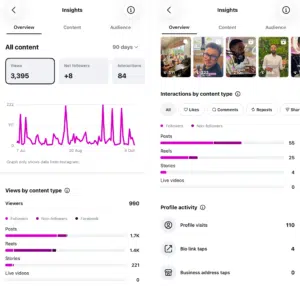
The layout and terminology can change, so don’t worry if your screen looks slightly different from an older guide.
One recent example is impressions. Instagram has increasingly moved towards Views as its main visibility metric, so older advice focusing heavily on impressions may now refer to Views instead.
The key is not memorising every metric. It is understanding what the most useful ones can tell you.
Views and Reach: How Many People Are Seeing Your Content?
Views tell you how many times your content has been displayed or played.
One person can create more than one view, so this is not necessarily the number of individual people who have seen your post. Reach, on the other hand, tells you roughly how many unique accounts have seen your content.
Both are useful when you want to increase awareness.
For example: if one Reel reaches 7,000 people when your normal posts reach 1,000, look at what was different.
Was the topic more useful? Did the video get to the point more quickly? Was it shared more often? Did it reach more non-followers? The aim is to understand why something performed well so you can test similar ideas again.
Views and reach are useful, but they should not be looked at in isolation. A post with thousands of views but no profile visits, follows or enquiries may not be helping you achieve your wider business goals.
Engagement, Saves and Shares: What Does Your Audience Value?
Engagement means people interacting with your content.
That could include:
- Likes
- Comments
- Saves
- Shares
- Replies
These actions can tell you different things.
A like is quick. A comment takes more effort. A share suggests somebody thought the content was worth sending to another person, while a save often means they found it useful enough to return to later.
This is why saves and shares are particularly useful when planning future content.
If your simple “five things to check before winter” carousel receives far more saves than your company news posts, that may suggest your audience values practical, educational content.
Similarly, if short videos answering common customer questions receive lots of shares, that could become a regular part of your content strategy.
Research by Socialinsider found that Reels generated particularly strong share rates, while carousel posts performed strongly for saves. Another study found carousels achieved an average engagement rate of 0.55%, compared with 0.52% for Reels and 0.37% for single-image posts in its dataset.
That does not mean every business should suddenly post nothing but carousels or Reels. It simply shows why testing different formats and looking at your own results is important.
Comments Can Give You Content Ideas
Comments are useful for more than measuring engagement. They can reveal:
- Questions people regularly have
- Misunderstandings about your products or services
- Topics your audience wants to know more about
- Objections that may be stopping people from buying
If several people ask the same question underneath a post, you have effectively been given your next content idea. You could turn the answer into a Reel, carousel, Story or even a blog.
Social media analytics do not always require complicated reports. Sometimes the most useful insight is simply noticing what your customers keep asking.
Followers and Profile Visits: Are People Taking the Next Step?
Follower numbers are often treated as the main sign of Instagram success, but more followers do not automatically mean better marketing.
A smaller audience that regularly engages, visits your website and makes enquiries can be far more valuable than a large but inactive following. Instead of only watching your total follower count, look at what content is actually generating new follows.
Did a particular Reel lead to more followers? Did growth improve after you introduced an educational content series? This helps you understand what is attracting the right people.
Profile visits are also useful because they show that somebody has gone from seeing your content to actively finding out more about your business.
If you are receiving lots of profile visits but very few follows or website clicks, your profile may need improving.
Someone landing on it should quickly understand:
- Who you are
- What you do
- Who you help
- Why they should follow you
- What they should do next
Think of your Instagram profile as a small landing page. Getting people there is only half the job.
Audience Data: Are You Reaching the Right People?
Instagram can also provide information about your audience, including details such as age ranges, locations and when followers are active.
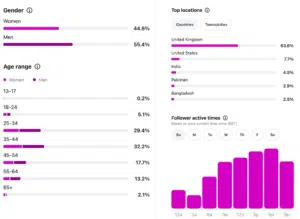
This helps you check whether the people engaging with you match the audience your business actually wants to reach.
For example: if your customers are mainly based in one region but most of your Instagram audience is elsewhere, it may be worth reviewing your content, locations, collaborations or paid campaigns.
The goal is not always to reach the biggest possible audience, it’s to reach the right audience.
Reel Analytics: Are People Actually Watching?
With video content, it is also worth looking at how long people stay interested.
This is often referred to as retention, which simply means how successfully your content keeps somebody watching.
If one Reel holds attention much longer than another, compare the two.
Perhaps the stronger video:
- Gets to the point more quickly
- Starts with a clear question
- Is shorter
- Uses captions
- Covers a more relevant topic
You do not need to follow every Instagram trend. You need to understand what keeps your audience interested.
Look for Patterns, Not One-Off Results
One of the biggest mistakes businesses make is reacting too strongly to individual posts.
One Reel performs badly, so they decide that videos don’t work. One carousel performs well, so suddenly everything becomes a carousel.
Instead, look at your results over several weeks or months.
Ask:
- Which topics consistently perform well?
- Which formats generate the most reach?
- What receives the most saves and shares?
- What generates profile visits?
- Which posts lead to new followers or enquiries?
The longer you collect data, the easier it becomes to spot useful patterns.
Match Your Analytics to Your Marketing Goals
Not every post needs to achieve the same thing.
If your goal is brand awareness, you may focus more on reach, views and shares.
If you want to build an engaged audience, comments, saves, shares and follower growth may matter more.
If Instagram is expected to generate enquiries or sales, profile visits, website activity, messages and leads become much more important.
There is little value in celebrating thousands of views if your actual objective was to generate enquiries and nobody took the next step. Start with the business goal, then decide which numbers tell you whether you are getting closer to it.
Turn Your Analytics Into Action
You do not need a huge reporting system to make Instagram analytics useful.
A simple monthly review could look at:
- Your best-performing posts
- Which content received the most saves and shares
- Which posts generated followers
- Overall follower growth
- Profile visits and website activity
- The strongest-performing topics and formats
Then ask the most important question:
What are we going to do differently next month?
For example:
“Our educational carousels consistently receive more saves, so we will create more of them.”
“Short Reels answering customer questions get shared the most, so we will turn our FAQs into videos.”
“Reach is increasing but profile visits are not, so our calls to action need improving.”
That is what turns analytics into strategy rather than simply collecting numbers.
Use Your Own Data as Your Main Benchmark
Industry averages can provide useful context, but they should not dictate your entire strategy. For example, a specialist B2B business cannot sensibly compare itself with a large consumer brand and expect the same results.
Your own performance is often the most useful benchmark.
Are more of the right people seeing your content than three months ago? Are you receiving more meaningful interactions? Are profile visits, website traffic or enquiries increasing?
Those answers tell you far more about whether your strategy is moving in the right direction.
Need Help Making Sense of Your Instagram Analytics?
Knowing where to find the numbers is one thing. Turning them into a digital marketing strategy that produces results is another.
At CDA, we have extensive experience using social media analytics, audience insight and content performance to build digital strategies around what is actually working.
Our approach is straightforward and jargon-free. We look at the data, explain what it means and use it to identify practical opportunities to improve reach, engagement and results.
If you are unsure what your Instagram analytics mean or want some help turning the data into a clearer digital marketing strategy, get in touch with the CDA team today.
