



Who Should Read This?
- Social media managers and content creators posting regularly on Instagram, Facebook, TikTok or Pinterest
- Marketing teams using Canva for product photography, ads or social graphics
- eCommerce businesses relying on tools like Background Remover for listings
- Brand and comms teams concerned about audience trust and content transparency
- Anyone confused about why a “normal” edited photo has suddenly picked up an AI label
Why It’s Worth Reading
- Everyday Canva tools, including the Background Remover, are causing content to be labelled as AI-generated on social platforms
- Social platforms are reading hidden file data, not judging how the image actually looks
- This sits within a wider industry push for more transparency around AI-assisted content
- Understanding which Canva tools trigger labels can help you plan content and captions with fewer surprises
- It’s a useful moment to understand the difference between generative AI and the more task-specific AI used in tools like Canva
What You’ll Learn
- Why a simple background removal can result in an “AI Info” label on Instagram
- Which Canva tools use AI, and how they differ from one another
- How social platforms are tightening up their AI transparency rules
- The difference between generative AI (like ChatGPT) and the more task-focused AI used in design tools
- What this all means for anyone posting design or product content on social media
Anyone who regularly posts on Instagram may have noticed something new lately: photos that were simply edited, not AI generated, are showing up with an “AI Info” label attached. A recent Instagram post on this topic pointed out that even Canva’s Background Remover, a tool that isn’t marketed as “generative” and doesn’t have Canva’s usual little sparkle icon next to it, can be enough to get a post flagged.
For anyone who has used that tool for a straightforward product photo or profile picture, it can be a bit surprising. So here’s a quick breakdown of what’s actually going on.
Why Is a Simple Edit Being Labelled as AI?
The label isn’t based on a platform looking at the image and deciding it “looks AI-made.” It’s based on hidden data embedded in the file itself.
Many design and editing tools, including several from Canva, write a small amount of technical information into an image when it’s exported. This data records details about how the file was created or edited, including whether an AI-powered tool touched it at any point.
Social platforms such as Instagram, Facebook and TikTok scan uploaded images for this information. If it shows that an AI tool was involved anywhere in the editing process, even for something as simple as cutting out a background, the platform can attach an AI label, regardless of how the finished image actually looks.
What Types of AI Tools Does Canva Actually Have?
Canva has built AI into a wide range of features, usually grouped under “Magic Studio.”
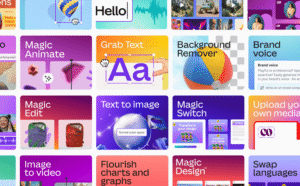
Image Credit: Canva.com
Not all of them work the same way, which is part of why the labelling can feel inconsistent. Broadly, they fall into a few categories:
Content generation tools – these create something new from a prompt:
- Magic Media / Text to Image, which generates images or short video from a written description
- Magic Write, which drafts or rewrites text and captions
- Magic Design, which builds full design templates from a one-line prompt
Photo and object editing tools – these work with an existing image rather than generating a new one:
- Background Remover, which automatically detects and removes the background from a photo
- Magic Eraser, which removes unwanted objects, people or blemishes from a photo
- Magic Grab, which lets you select and move an individual object within a photo, with AI filling in the space behind it
- Magic Expand, which extends the edges of an image and fills the new space with AI-generated content
Layout and workflow tools – these use AI to speed up production rather than to create new visuals:
- Magic Resize, which automatically reformats a design for different platforms
- Magic Switch, which converts one type of content into another, such as turning a presentation into a social post
- Magic Animate, which adds motion to an otherwise static design
It’s the editing tools that primarily seem to be catching people out. Someone using Background Remover on their own photo may not think of it as “AI generated”, but from a platform’s point of view, the file’s metadata tells a different story.
How Are Social Platforms Tightening Up on AI Transparency?
This labelling isn’t a one-off, it’s part of a broader industry move towards clearer disclosure of AI-assisted content.
Meta introduced its “AI Info” label across Instagram and Facebook, replacing an earlier “Made with AI” label, and applies it automatically wherever an uploaded file carries recognised AI-related metadata. Other platforms, including TikTok and Pinterest, have introduced similar systems.
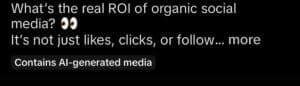
The intention behind this is straightforward: as AI-assisted editing becomes more common, platforms want a consistent, automated way to flag content that may have been influenced by AI, rather than leaving it to individual judgement or manual review. The trade-off, for now, is that the system reads what a file says about itself rather than assessing what the image actually shows, which is why background removal and full image generation can end up under the same label.
Platforms may well refine this over time, distinguishing between minor AI-assisted edits and fully AI-generated content. For now, though, the two are often treated the same.
Generative AI vs the AI Inside Canva – What’s the Difference?
It’s worth briefly separating out two AI terms that often get used interchangeably.
Generative AI, such as ChatGPT, Claude or CoPilot, works reactively. You give it a prompt, and it produces something new such as a paragraph of text, an image, or a design, based on patterns it has learned from large amounts of data. Nothing happens until you ask for it, and each output is a fresh, one-off response.
Tools like Canva’s Background Remover, Magic Eraser and Magic Grab sit a little differently. Rather than creating something new from a prompt, they carry out a specific, narrow task automatically on content you already have, such as detecting a subject, filling in a gap, or isolating an object. This is closer to the more task-focused, action-oriented end of AI, sometimes grouped under the “agentic” label, where the software performs a defined job on your behalf rather than generating original creative content.
The practical distinction that matters for content creators: one type invents new content, the other automates an editing task on content that already exists. Platform labelling systems, however, don’t currently draw much of a line between the two, so both can trigger the same disclosure label.
Final Thoughts
None of this means Canva’s AI tools are doing anything wrong, or that using them is something to avoid. Background removal, object erasing and similar features are genuinely useful, time-saving tools that a huge number of people rely on for everyday content.
What it does mean is that the line between “I used AI” and “I made a small edit” is being drawn by file metadata rather than by how the finished image actually looks, at least for now. Understanding which tools are more likely to trigger a label, and why, makes it easier to know what to expect when you post, rather than being caught off guard by a tag appearing under content that doesn’t feel “AI-generated” at all.
It’s also worth noting that the popular AI platform Claude recently announced that they are watermarking content that is written in its platform. This is part of a wider AI labelling movement which could eventually impact Google’s algorithm. At present, Google permits AI-assisted content and judges it on quality, not production method, but this could change as things develop over time.
As platforms continue to refine how they detect and disclose AI involvement, this is likely to keep evolving. For now, it’s simply worth knowing that even the most ordinary design tools can carry an AI ‘paper’ trail.
If you’d like help navigating how AI tools and platform transparency changes affect your content and social media strategy, get in touch with the CDA team.

